Pipeline
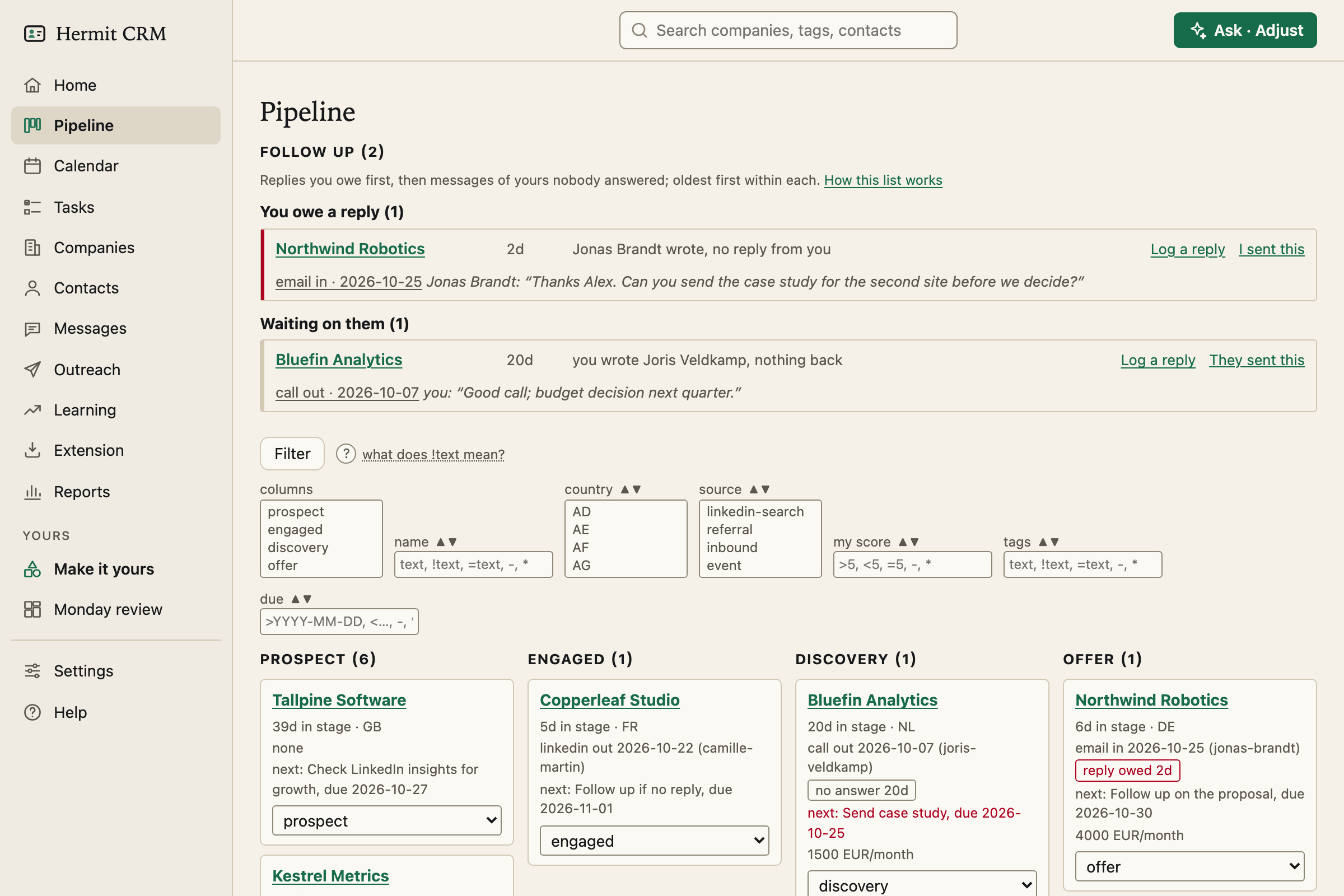
The pipeline is the board of every open company, one column per stage. It shows who to move, who to chase and what is due, without opening a single company.
In the left navigation: Pipeline
Screenshot of the released version on made-up demo data. Select it to open it full size.
A board with your own stages
The open stages are columns. The defaults are prospect, engaged, discovery and offer, and the stage names, their order and which ones count as closed are yours to change under Settings, Deal stages. A column with nothing in it is drawn narrow, so the whole board stays on one screen.
Cards that tell you what is next
Each card is one company, ordered by when its next step is due.
- The company name (a link to its page), the days it has been in this stage and its country.
- The last touch, such as
email in 2026-10-15 (jonas-brandt). - The next step with its due date, red when it is overdue.
- The monthly value, when you have set one.
- A stage dropdown that saves when you change it. Choosing lost takes you to the company page first, to give a reason.
The follow-up list
The list above the board has two groups: You owe a reply, a message they sent that you have not answered, and Waiting on them, a message you sent that nobody answered. Replies you owe come first, oldest first. Each row shows the channel, the direction and the date of the message it is about, as a link to it, and quotes its first words, with *you:* in front of your own. Log a reply records one in a click, and if a message was logged the wrong way round, I sent this or They sent this flips it and keeps the text as it was. A card on the board whose company is on the list carries a small badge. The thresholds are yours to change (a day for replies you owe and five days for nudges, by default).
Filters you can bookmark
Each column of the board has a control: pick which stages show, or filter the cards by name, country, source, score, tags or due date. Text boxes take a small syntax (text contains, =text equals, >x and <x larger or smaller, - empty, * not empty, and a leading exclamation mark means does not contain), and the ? next to Filter explains it. Filters combine, and they stay in the address, so a view is a bookmark.
Closed and parked, out of the way
Below the board every other stage is a collapsed list: won, lost, disqualified and temp-disqualified, each with its reason. A parked company comes back to the first open stage by itself on the date you gave it, in one commit.
The same board as text
PIPELINE.md in your data folder is the board as one Markdown page, rewritten on every change: stages with counts and monthly value, overdue next steps, silent accounts and recently closed companies. It is what your AI agent reads first.
Read the full Pipeline page in the docs
Related pages
Hermit CRM is a free, open-source CRM for founders, freelancers and anyone doing their own sales. It runs on your Mac or Linux computer and keeps every company, contact and conversation as a Markdown file in a git folder on your own disk. A local web app gives you a pipeline board, a calendar of next steps, message drafts and reports. AI tools such as Claude Code, Codex or Claude Desktop can read and update the pipeline through the files, a small CLI or the built-in MCP server. It is alpha software under the Apache License 2.0, with no warranty and no support.