Learning
Learning is how the outreach bot improves without anything changing behind your back. Your edits to its drafts and the replies to your messages are kept as signals, and a run turns them into proposals. A proposal changes your lessons only when you accept it.
In the left navigation: Learning
Screenshot of the released version on made-up demo data. Select it to open it full size.
Are your edits getting smaller?
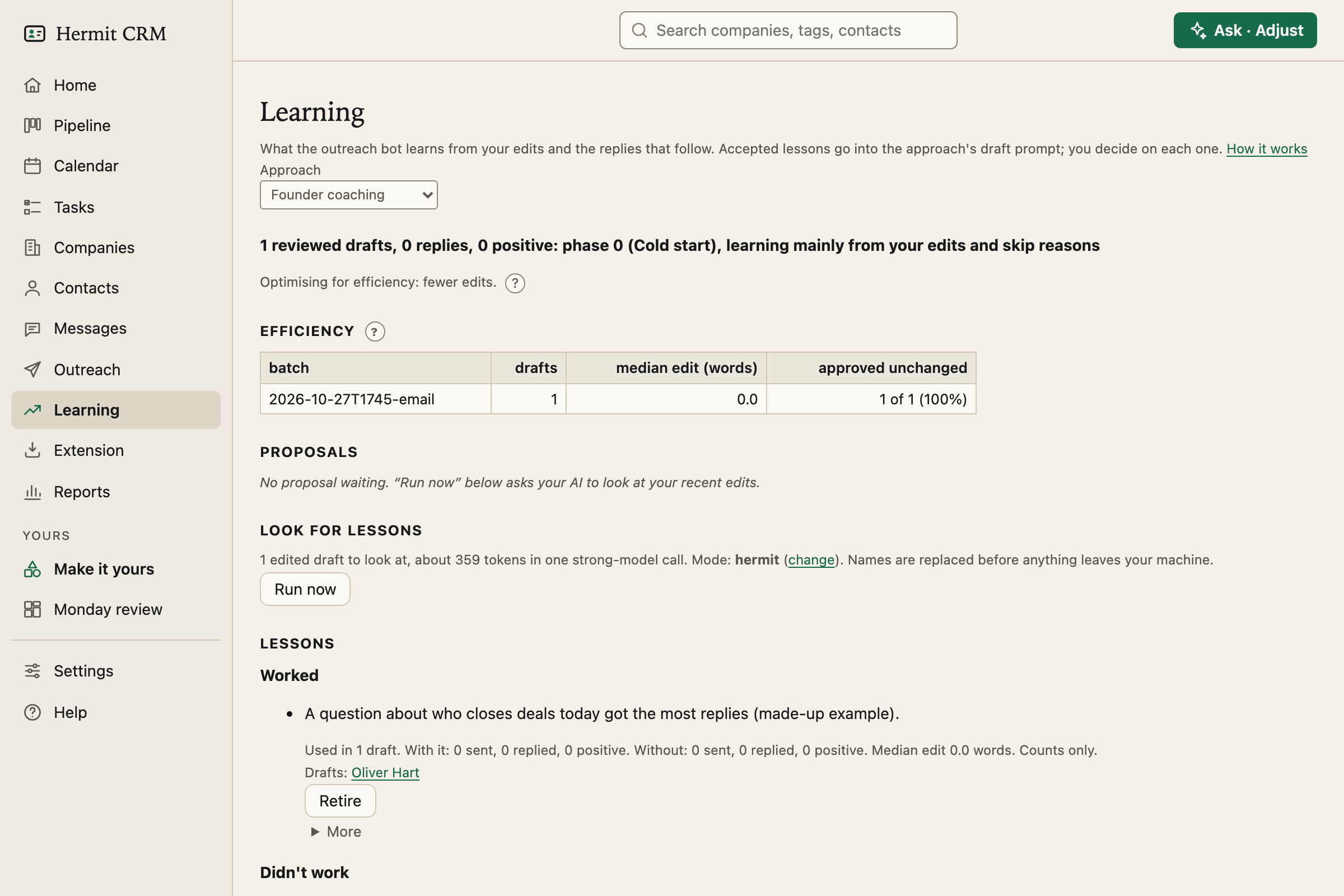
The page opens with the efficiency of the approach you pick: for each batch, how many drafts, the median edit in words and how many you approved unchanged. If learning works, the edits shrink and more drafts go out as they are. A banner says what phase you are in, such as *12 reviewed drafts, 2 replies, 1 positive*, because the more replies you have, the more weight outcomes get over edits.
Proposals, and nothing learned silently
Run now asks your AI tool once to look at your recent edits and the answers to your messages, with names replaced before anything leaves your machine. What comes back is a list of proposals. You accept one, optionally in your own words, or reject it, and a rejected proposal is never proposed again. If you would rather use your own agent, a hand-off writes an evidence pack for it to read.
Lessons that worked, and lessons that did not
Accepted lessons go into the approach’s draft prompt, and the page shows each one with how often it was used, how many messages got a reply and the median edit. Move a lesson between *worked*, *did not work* and *still testing*, or retire it. They live in your playbook, MESSAGING.md, under each approach, so you can read and edit them like any other file.
Examples instead of rules
A lesson is advice. An example shows the drafter what you mean: the closest earlier case, with names replaced. It is either a paragraph the AI wrote and the way you changed it, or a first message that got a positive reply. You can pin an example or exclude one that worked for a one-off reason. It is off until you choose it under Settings, Playbook.
From the command line
hermitcrm learn report prints the same numbers, including outcomes by persona, channel, language and framework, with cells marked *too few* until there are ten messages behind them. learn run, accept, reject, retire and move do the rest.
Read the full Learning page in the docs
Related pages
- Outreach: Researches a company’s website, drafts a first message or a follow-up in your wording, and waits for your approval.
- Messages: Every message you sent, with what came of it, so you can see which wording gets answers.
- Settings: Your name, mail and calendar capture, backups, fields, deal stages and outcomes, set in the browser.
Hermit CRM is a free, open-source CRM for founders, freelancers and anyone doing their own sales. It runs on your Mac or Linux computer and keeps every company, contact and conversation as a Markdown file in a git folder on your own disk. A local web app gives you a pipeline board, a calendar of next steps, message drafts and reports. AI tools such as Claude Code, Codex or Claude Desktop can read and update the pipeline through the files, a small CLI or the built-in MCP server. It is alpha software under the Apache License 2.0, with no warranty and no support.